

I was recently browsing through the oldest archived version of Moodle from 2018 before it was deleted. I came across a module with a varied and interesting mix of multimedia activities, however within one of the weeks there were 13 separate items listed. These were grouped by type – all videos together, all slide decks, ‘seminar activities’ documents, readings, and then links. Nothing was wrong with the content itself, but the way it was presented made it hard to know where to begin.
From the perspective of a new student, I couldn’t tell what I would need to do, how resources were connected and how to structure and prioritise my learning time. It’s easy to imagine how even a confident Higher Education student could feel overwhelmed.
This example is reflective of a common view of Moodle as a repository or ‘drop box’ for learning materials. A well organised repository is a useful learning tool however this view of Moodle no longer reflects its potential. Our understanding of virtual environments like Moodle has evolved considerably. Moodle at Kent is an active learning environment that can be shaped to optimise the learning experience for students, particularly when they are learning independently without direct support.
A common Moodle as a repository weekly module page*
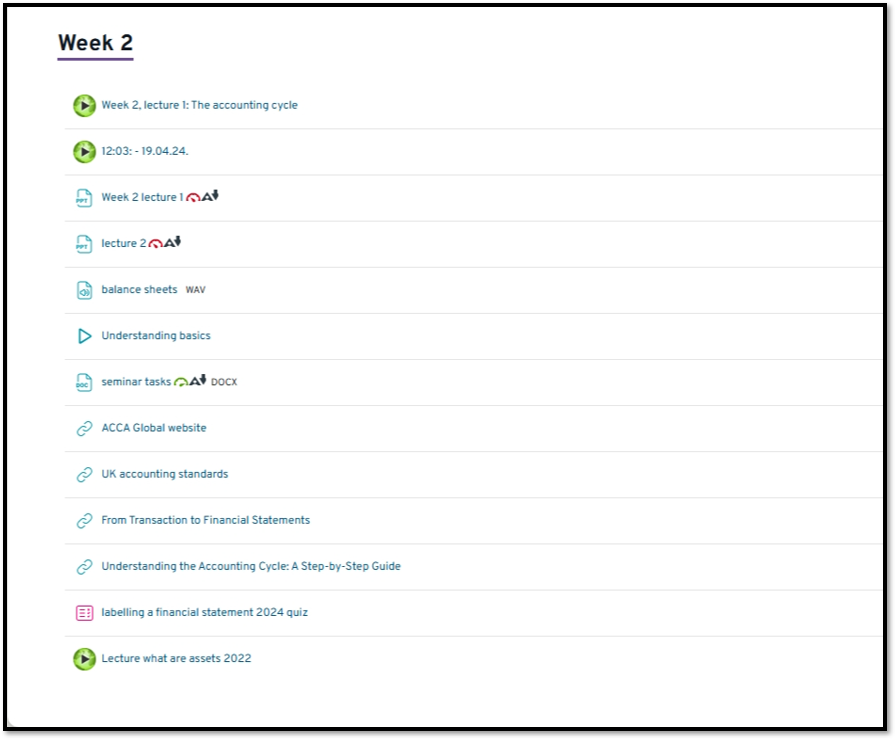
*The ‘before’ example used here is created solely for demonstration purposes and resembles no existing or previous module at Kent. Any similarity is purely coincidental.
Students spend significant time navigating and interacting with Moodle. Thoughtful design of weekly Moodle pages benefits students by clarifying expectations and learning pathways, and benefits staff by reducing low-level administrative and learning queries. As the portal to a module, Moodle is also an expression of what a Kent learning experience means to students.
Upgrading a Moodle page can seem a daunting labour-intensive task so I considered what simple changes to an existing weekly Moodle page could have the biggest impact, would require no more than 15 minutes per change and needed minimal technical knowledge.
The following five ideas are based on those criteria.
5 easy hacks for enhancing the learning experience of weekly Moodle pages

-
Use Moodle text and media areas to provide information that supports the weekly learning journey.
There is considerable benefit in actively using ‘Text and Media’ areas to communicate and mediate the presentation of key learning content and information for students. A short weekly schedule, overviews, and section headings provide structure for independent study and helps make the learning journey explicit. If you have the content ready or at hand, creating a ‘Text and Media area’, adding content and formatting text only takes a few minutes.
-
Use a Moodle ‘Page’ tool for making recorded video lectures more active and accessible.
A video lecture in isolation is often a passive experience. What should students do when they watch the video? Is there particular information they should be listening out for? How can you or the student know if they understand the content? Embedding a Panopto recording within a Moodle ‘Page’ allows you to add guiding questions, prompts, or supporting text alongside the video, turning it into a more active and supported learning activity. With your content ready, setting this activity up only takes a few minutes.
-
Use labelling and formatting to ease and optimise navigation and provide structure.
Providing headings and clear labelling can help optimise students’ independent learning. Clear, concise, and consistent labelling can provide an understanding of progression through learning materials and how they fit together in the wider context. It helps make the visual scanning of the Moodle page more efficient and provides a perceived structure to a course of study.
-
Use Moodle ‘Folder’ to visually prune and group long lists of resources.
Long lists of files can be overwhelming. Visually grouping related resources is a way for students to see how to manage their learning. It is a way to highlight what is key or what is related and helps students explore extended learning activity in more approachable ways. It is quick to create a Moodle ‘Folder’ and relatively straightforward to locate and pull files from other parts of a Moodle page into the folder using the File picker function. The File Picker will copy the file into the folder then you can delete the original.
-
Set Activity Completion settings to encourage student progression and participation.
Having a sense of completion of a set of learning has affective benefit for students as they can get a sense of achievement which can help them stay motivated and engaging with their learning. Activity Completion provides students with a sense of progress and achievement, while allowing staff to see engagement with key materials. It also helps scaffold independent learning by making expectations visible. For example, the successful completion of a weekly revision quiz can be set as a condition for accessing the next week’s learning resources. Completion conditions can be turned on for the module in the module’s settings option and then individual (or bulk) materials can be given specific completion conditions.
A More Structured and Student-Focused Weekly Moodle Page in 30 minutes
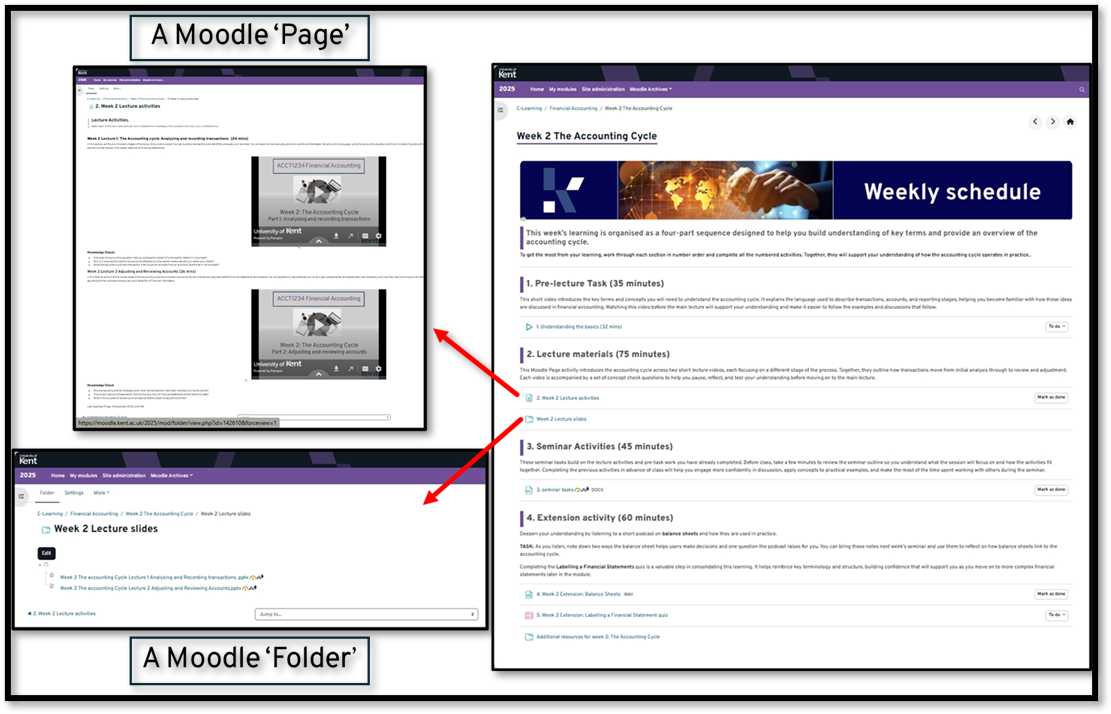
Applying each of these fixes was easy as most of the content for the sequence of learning was already populated. I did have to create some extra informative text content for students which took about 15 minutes. I already had an appropriate banner image to add to my first ‘Text and Media’ area. I then added 4 more ‘Text and Media’ areas to clearly separate the learning content, and to provide direction to help the learning become easier to navigate. I used clear and consistent labelling and a numerical listing to make the structure of learning clear to students. I also took a few minutes to add completion conditions to the core activities to help staff and students track progress and completion of the learning for the week.
Using Moodle tools
As can be seen in the image, a Moodle ‘Page’ tool was used to create an active learning sequence from 2 embedded lecture videos. I took some relevant low-level questions from the seminar resources and added them to the page. This potentially provides some extra space for deeper learning in class. The Moodle ‘Folder’ function was used to reduce the visual clutter on the page, group relevant resources, and allow the core activities to be more visually prominent on the page, helping to provide a clear trajectory for the week’s learning.
For what was little effort in creating some extra content and less than 30 minutes setting things up, these changes have significantly improved the experience students will have of that week’s Moodle page. The text is accessible to screen readers and the content will adapt to the various screen sizes students might use.
As we begin a new term, what could ‘5 easy hacks for enhancing your weekly Moodle page’ do for your Moodle experience? Consider selecting just one upcoming week in your module and applying one or two of these small changes to support students’ independent learning.
If you would like support as you explore the potential of Moodle for your teaching at Kent, Book a consultation with a Learning Designer.