

The integration of digital tools has become essential for enhancing learning experiences in higher education, helping educators move beyond passive lectures to create interactive and engaging learning environments. In this blog we’ll explore two powerful tools we have available to all staff at Kent that provide significant pedagogical advantages. One is our existing polling tool- Vevox, and the other is Moodle Board, which is new for 2025. Both these tools offer collaboration opportunities and support diverse learning needs.
Moodle Board
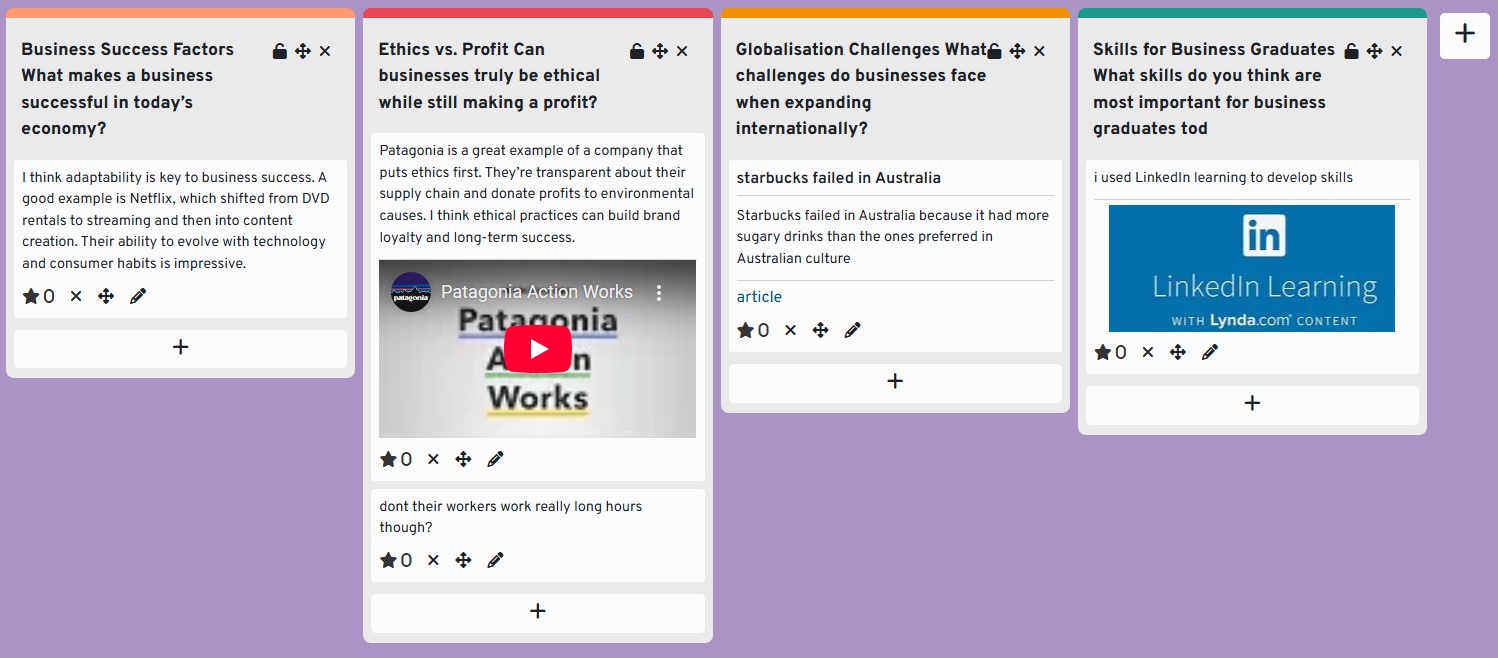
Moodle Board is a collaborative activity, similar to Padlet but fully integrated into Moodle, designed to facilitate interactive learning and student engagement. It allows participants to post virtual “cards” containing text, images, or links onto a shared board, which is structured into customizable columns, set by the educator. These columns can represent categories such as themes, stages of a process, essential resources, or reflective prompts.
The activity supports both individual and group contributions, with options for anonymous posting, voting and rating, and comment threads. Teachers can moderate content, configure permissions, and track student participation.
Here are 3 top reasons to use Moodle Board
Interaction and collaboration
Moodle Board allows students to post and share content in a visually engaging and interactive way which can encourage and motivate students to participate, perhaps more so that more traditional tools such as forums which can often have low participation rates. Board offers a great way for students to collaborate in real time on projects, share ideas and resources, reflections and peer feedback.
Flexibility
Moodle Board supports various types of content, including text, images, videos, and links. Teachers can use boards to conduct formative assessments, such as quick polls, quizzes, or feedback sessions. This helps monitor student progress and provides insights into their understanding.
Accessibility
Moodle Board is fully accessible. Board is a tool that can be particularly useful to distance learning students.
Vevox
Vevox is a real-time polling and Q&A platform that you can use to add interactive elements to your teaching to engage students. This active participation keeps students engaged and attentive, leading to better retention and understanding of the material. With Vevox you can pose live questions in lectures and seminars—such as multiple choice, word clouds, open text, and ranking polls—that students can respond to anonymously using their own devices. This anonymity encourages honest participation, particularly in large cohorts. Results are displayed instantly, providing immediate feedback and facilitating discussion. The platform also includes a moderated Q&A feature, where students can submit questions during a session.
Vevox integrates with PowerPoint and Microsoft Teams, making it easy to embed interactive elements into lectures or seminars. New for 2025 you can also choose Vevox as an activity on your Moodle page.
Here are 3 top reasons to use Vevox
Immediate feedback
Vevox can be used to check understanding, gather opinions, run formative assessments, or facilitate peer learning. This immediate feedback is invaluable for ensuring that students grasp key concepts.
Anonymity and Inclusivity
Vevox allows students to respond anonymously, which can encourage participation from those who might be hesitant to speak up in class. This inclusivity ensures that all students have a voice.
Mid- Module feedback
New for 2025 Vevox can be used to gather your mid module feedback.
We encourage all staff to explore the potential of Moodle Board and Vevox and to incorporate these tools and others into their teaching strategies. By integrating these tools into courses, you can create interactive, inclusive, and effective learning environments.